
NWS vs Apple Weather: why rain forecasts differ
NWS and Apple Weather produce separate forecasts. Different update times and time windows can change the rain chance you see. Here’s how to read the difference and compare sources in Waifu Weather.
Why NWS and Apple Weather forecasts differ
A forecast is an estimate of what will happen at a place and time. It is not a measurement of the future. The NWS forecast process combines observations, computer guidance and forecaster expertise. Uncertainty remains, especially as the forecast reaches further ahead.
Apple Weather is a separate forecasting service. Waifu Weather accesses it through Apple’s WeatherKit. Apple lists national weather services and other organizations among its data sources, but shared inputs do not make the finished forecasts identical.
A useful way to think about a disagreement: the services may place the rain at different times or locations. A shift in a shower’s expected arrival can turn a wet afternoon into a drier one in the hourly view. A different update time can also leave one forecast reflecting newer information.
Compare the same saved location, date and hour, in the same units. A nearby city, a location selected by GPS, and a forecast for the other side of a mountain are not necessarily the same comparison.

What does a 40% chance of rain mean?
For NWS, a 40% probability of precipitation means a 40% chance that the forecast point receives at least 0.01 inches of precipitation during the specified period. It does not mean rain for 40% of the day, or that 40% of your neighborhood will get wet. See the NWS explanation of precipitation probability.
Keep three questions separate:
- Chance
- How likely is measurable precipitation during this period?
- Amount
- How much precipitation is forecast to accumulate?
- Timing
- When might it start, stop or become heavier?
A high chance can accompany a small amount. A lower chance does not guarantee dry weather. Read the hourly detail and amount together before deciding whether a raincoat or a change of plans makes sense.
Daily chances and hourly amounts need context
In Waifu Weather’s NWS view, the daily rain chance generally uses the higher of the NWS daytime and nighttime chances. When those periods are absent, it uses the highest available hourly chance for that day. The app does not add or average hourly probabilities to invent a daily chance.
The Apple Weather view uses the daily probability supplied by WeatherKit. These summaries are not guaranteed to describe precisely the same time window. A wet overnight period can make a daily row look rainy even when the afternoon hours are mostly dry.
A rainy night can raise the daily percentage
If NWS gives the daytime a 20% chance and tonight a 70% chance, the NWS daily row can show 70%. For a 2–4 p.m. walk, look at those hours rather than treating the daily percentage as an afternoon forecast.
Amounts have another limitation: Waifu Weather spreads NWS multi-hour precipitation totals across the hours they cover. These hourly amounts are approximations, not a prediction of steady rain every hour. For example, 6 mm over six hours can display as 1 mm per hour even if the rain eventually falls in one short burst.
NWS does not provide minute-by-minute precipitation in this app. Apple Weather can provide a next-hour forecast where available. A near-term precipitation view and an hourly rain percentage answer different questions; one should not be read as a direct replacement for the other. Apple documents regional availability.
How to change your preferred weather provider
Open Settings inside Waifu Weather.
- Tap the … menu, then Settings.
- Under Weather, tap Weather provider.
- Choose National Weather Service or Apple Weather (WeatherKit).
- Close Settings and let the forecast reload.
Your choice supplies the main forecast and the weather used for briefings and planning. It is saved on this installation; the app keeps the providers’ forecasts separate.
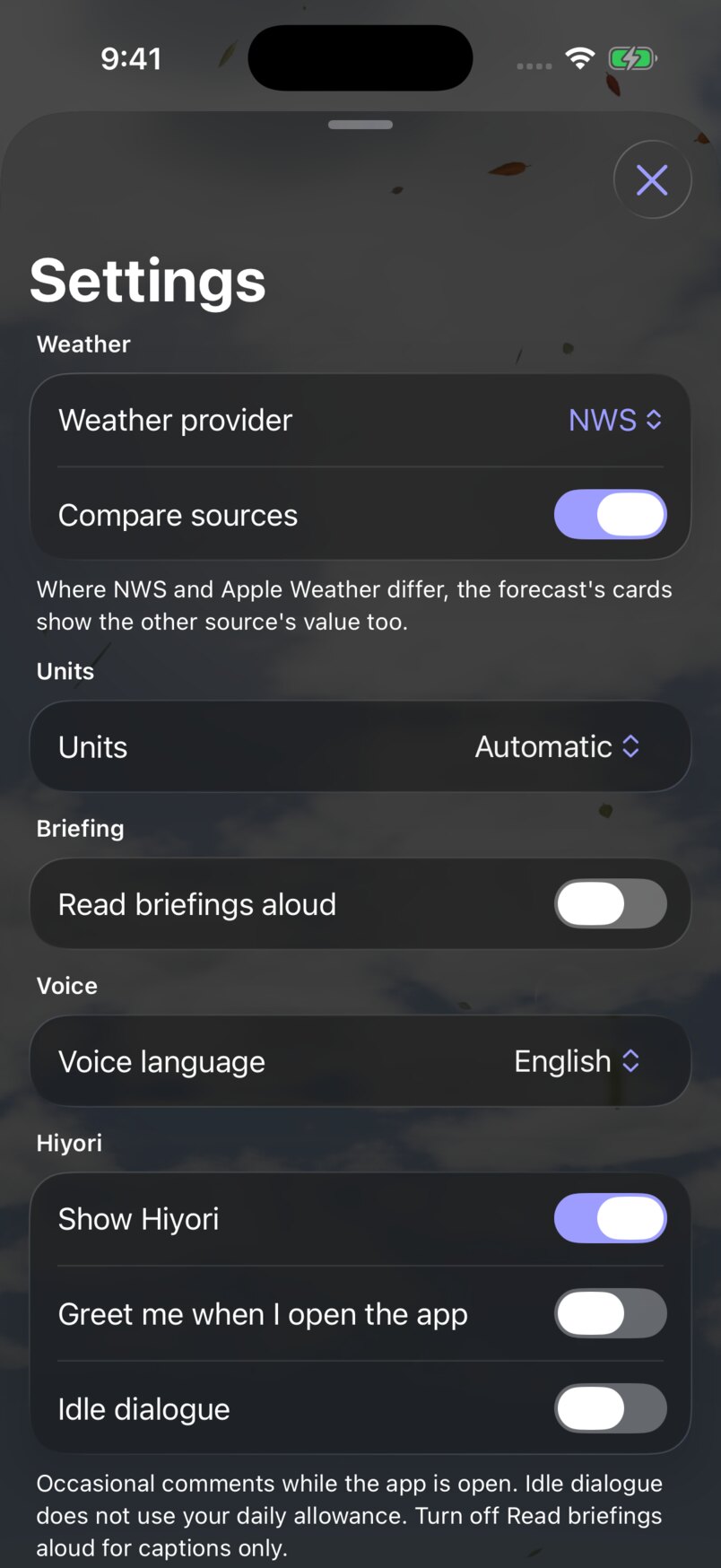
How to enable weather provider comparisons
- Open Settings from the app’s … menu.
- Under Weather, turn on Compare sources.
- Return to the forecast and allow the other source to load. Look for extra values on the hourly forecast, daily outlook and weather detail tiles.
- Tap a day or a weather metric to explore the comparison in its detail view. Charts can include another source’s line for the same measurement.
The main values still come from your selected provider. Extra values appear where the sources differ enough to meet the app’s comparison thresholds. Close agreement, a missing measurement, or an unavailable forecast may leave no extra value to show. No comparison label does not mean the providers are identical.
Look for the extra rain chances
The extra row shows Apple Weather’s rain chances. Turning Compare sources off hides those values while keeping your selected forecast.
Comparisons are visual context. They do not change the provider used for Hiyori’s briefing, plans or notifications, and the app does not average the providers’ values. Turning the toggle off removes the comparisons and stops requests made for them.
If you do not see a comparison
Check that you have a current app build and a location covered by both providers. The toggle is available when the app has multiple sources to compare; sample-only previews may not offer it. Give the second source time to load, or pull to refresh. If it has no forecast or no matching measurement, the app cannot show that comparison.
Which forecast should you use?
This guide does not rank provider accuracy. A single screenshot or rainy afternoon cannot establish which service is better for every location, season or forecast lead time.
Choose a main provider, then use comparisons to spot uncertainty around the hours that matter to you. If one forecast keeps your evening dry and the other brings rain forward, keep a backup plan and check again closer to departure. Comparing hourly chance, amount and timing is more useful than choosing whichever daily icon looks nicest.
For hazardous weather, read official alerts and local NWS guidance. A preferred forecast source is separate from an alert’s issuing agency: Waifu Weather can supplement Apple Weather’s missing or empty alert list with NWS alerts in supported areas, without replacing the Apple forecast.
Sources and further reading
Weather references and app instructions checked November 4, 2026. Screenshots use illustrative sample data to explain the UI, not to compare provider accuracy. Labels and availability may change as the app develops.
- NWS: probability of precipitation
- NWS: how forecasts are made
- Apple: WeatherKit overview
- Apple: feature availability and data sources
- WeatherKit data sources
Need help with the app? Contact Waifu Weather support.
Put the guide into practice in Waifu Weather for iPhone.